


A CRM for distributors should connect customer conversations with product, pricing, inventory, quote, order, and payment data. It should give a sales rep enough context to answer a buyer without opening several applications.
A configurable general CRM may suit a small distributor with a simple process. Businesses with thousands of SKUs, frequent repeat orders, field representatives, or complex pricing should also evaluate purpose-built distribution CRMs. Choose according to your ERP, selling model, data quality, and daily workflows—not the longest feature list.
What Makes a Distributor CRM Different?
Many standard CRMs follow a linear process: capture a lead, qualify it, and close the deal. Distribution sales rarely end at the first order. Growth often comes from protecting accounts, increasing order frequency, recovering inactive customers, and expanding category sales.
A useful distributor CRM therefore needs to understand more than contacts and deals. Before a customer call, a representative should be able to see:
- Recent purchases and normal reorder patterns
- Open quotes, orders, returns, and service issues
- Customer-specific prices, discounts, and contract terms
- Available or expected inventory
- Credit status or overdue invoices, when authorized
- Products the account has stopped buying
- The last interaction and next action
The ERP remains the operational system of record; the CRM turns that data into sales actions.
CRM vs. ERP vs. Distribution Management Software
These systems overlap, but they are not interchangeable.
| System | Main job | Typical data and processes | Primary users |
|---|---|---|---|
| CRM | Win, retain, and grow accounts | Contacts, activities, opportunities, quotes, follow-ups, territories, service history | Sales, marketing, account management, customer service |
| ERP | Run and record the business | Inventory, purchasing, orders, invoices, accounting, credit, fulfillment | Finance, operations, purchasing, warehouse teams |
| Distribution management software | Coordinate distributor-specific operations | Inventory, order processing, pricing, warehouse, purchasing, shipping, and sometimes CRM | Operations and management across the company |
A CRM is not a substitute for inventory control or accounting. Decide which application owns each field. The ERP may own stock, invoice status, and approved prices, while the CRM owns call notes, opportunities, and next actions. Clear ownership prevents conflicts.
Seven Capabilities to Require in CRM for Distributors
1. Reliable ERP and Inventory Integration
Confirm which records move, in which direction, and how often. Accounts, locations, items, prices, quotes, orders, invoices, inventory, and returns may be relevant.
Ask what happens when a synchronization fails. An integration logo does not prove that the connector supports your ERP version, custom fields, or required data volume.
2. Complex Account and Pricing Support
The CRM should represent parent companies, branches, buying groups, contacts, and locations without creating duplicate accounts.
It should respect contract pricing, quantity breaks, rebates, discounts, and approval limits. Old price data must not allow a representative to promise an invalid price.
3. Quote-to-Order Workflow
Look for product search, quote templates, margin visibility, approvals, e-signatures, and quote-to-order conversion.
If the ERP creates orders, the handoff should preserve approved items, quantities, prices, tax, and shipping details. Employees should not have to re-enter the complete order manually.
4. Repeat-Sales Intelligence
A distribution CRM should reveal buying-cycle changes, inactive accounts, open quotes, category gaps, and cross-sell opportunities.
AI suggestions can help representatives decide which accounts to contact. However, the platform should show the supporting data behind each suggestion. Incomplete transaction history can produce poor recommendations.
5. Practical Mobile Tools
Field representatives need account search, calling, visit planning, notes, tasks, and essential order data.
If employees regularly work in areas with poor connectivity, test offline access and later synchronization. Do not assume that every mobile CRM will function correctly without a reliable internet connection.
6. Territory, Partner, and Service Management
The system should support account ownership, territories, lead routing, and reassignment without losing customer history.
Channel businesses may also need partner portals, lead registration, and shared opportunities. Representatives should see open service cases and returns so they do not make poorly timed sales calls.
7. Security and Data Control
Require role-based access, multifactor authentication, encryption, audit logs, recovery controls, and full data export.
Confirm that costs, margins, credit details, and customer-specific prices can be restricted. Request current independent security documentation instead of relying only on general security statements.
CRM Options Worth Shortlisting
The following platforms are grouped according to business fit. They are not ranked from best to worst. Product capabilities, connectors, and commercial terms can change, so verify every requirement through a live demonstration and written contract.
| CRM | Best fit | Reason to consider it | What to verify |
|---|---|---|---|
| Proton CRM | High-SKU distributors focused on repeat-account growth | Purpose-built workflows, ERP-synced transaction data, sales recommendations, and voice activity capture | ERP compatibility, reporting depth, and support for marketing or service workflows |
| White Cup CRM + BI | Established distributors wanting CRM and business intelligence connected to a distribution ERP | Buying trends, account opportunities, sales activity, and operational data in role-based views | Support for your ERP version, custom data, implementation scope, and refresh frequency |
| Pepperi | Consumer-goods brands and wholesalers needing mobile ordering and B2B commerce | Field order taking, catalogues, B2B commerce, trade promotions, and retail execution | Whether it will replace or connect with your CRM, plus offline, pricing, and ERP behaviour |
| Microsoft Dynamics 365 | Mid-size or enterprise businesses invested in Microsoft applications | Sales, service, finance, and supply-chain applications within the Microsoft ecosystem | Required applications, licensing, implementation partner, connector design, and administration |
| Oracle NetSuite CRM | Businesses already using NetSuite ERP | Sales, service, partner management, order information, and customer visibility within NetSuite | Sales-rep usability, required modules, configuration effort, and total cost |
| Zoho CRM with Zoho Inventory or Finance apps | Small and mid-size distributors seeking a configurable ecosystem | CRM automation, territory tools, inventory-related modules, mobile access, and numerous integrations | Separate product requirements, multiwarehouse support, editions, and two-way synchronization limits |
| Salesforce | Enterprises with complex sales, partner, territory, or customization requirements | Extensive configuration, automation, reporting, partner capabilities, and integration options | Distribution add-ons, implementation resources, connector ownership, and total cost |
If you need only a visible deal pipeline and follow-up automation, a simpler sales CRM such as Pipedrive or HubSpot may work. However, budget for connectors and customization to expose inventory, orders, and customer pricing. A low license price can become misleading after integration and administration costs are added.
Use This 100-Point CRM Selection Scorecard
Rate each candidate from 1 to 5 for every category. Calculate the weighted score using this formula:
Weighted score = rating ÷ 5 × category weight
Demand evidence for every score. Do not award points based only on promises made during a sales presentation.
| Evaluation category | Weight | Evidence to request |
|---|---|---|
| ERP, inventory, and data integration | 25 | Demonstration with sample data, field map, synchronization frequency, error handling, and connector ownership |
| Distribution workflow fit | 20 | Completion of your quote, reorder, pricing, account, return, and approval scenarios |
| Representative usability and mobile access | 15 | Timed test completed by inside and outside sales users, including offline use when required |
| Reporting and sales intelligence | 10 | Dashboards using order, margin, category, territory, and account activity data |
| Automation and AI controls | 10 | Explainable recommendations, approval rules, editable workflows, and human review points |
| Security and administration | 10 | Access controls, audit history, security documents, backup process, and complete data export |
| Three-year cost and vendor support | 10 | Written costs for licenses, add-ons, integration, implementation, training, support, and expected increases |
A high total should not rescue a system that fails a critical requirement. Treat unreliable ERP synchronization, poor data-export options, or an unusable mobile workflow as possible disqualifiers.
Run a Proof of Concept Before Signing
Give each vendor the same anonymized data. Ask one of your sales representatives—not the vendor—to complete these tasks:
- Open a parent account and view its branches, contacts, purchases, open orders, and unpaid invoices.
- Confirm customer pricing and stock, build a quote, request approval, and convert it into an order.
- Identify an account whose normal reorder is late and create an appropriate follow-up.
- Find a category bought by similar accounts but not this customer, then explain the recommendation.
- Record a field visit, assign a service task, and make the history available to inside sales.
- Produce a manager dashboard showing pipeline, quote conversion, gross margin, inactive accounts, and activity by territory.
Record completion time, clicks, errors, missing data, and user comments. This process exposes friction that a polished demonstration can hide.
A Practical 90-Day Implementation Plan
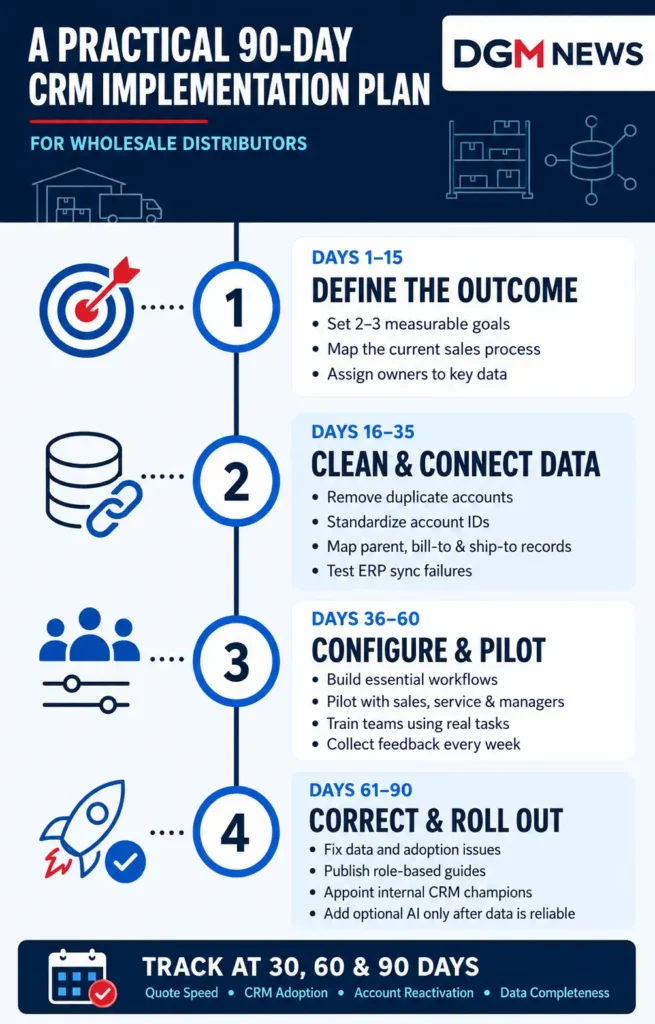
Days 1–15: Define the Outcome
Choose two or three measurable goals, such as faster quote responses, more reactivated accounts, or higher category penetration. Document the existing process and assign an owner to each important data field.
Days 16–35: Clean and Connect the Data
Remove duplicate accounts, standardize identifiers, and map parent, bill-to, and ship-to relationships. Avoid migrating unnecessary historical data.
Configure the ERP connection and test failed records, not only successful ones. Confirm which team will investigate synchronization errors after launch.
Days 36–60: Configure and Pilot
Build only the workflows required for the first release. Run a pilot involving inside sales, outside sales, management, and customer service.
Train employees using real tasks and customer scenarios. Collect workflow problems and user feedback every week.
Days 61–90: Correct and Roll Out
Fix major data and adoption issues before adding more users. Publish role-based instructions, appoint internal CRM champions, and use CRM data during coaching sessions.
Delay optional automation and AI features until core account, product, pricing, and transaction records are dependable.
Measure Whether the CRM Is Working
Capture a performance baseline before launch. Review the same measurements after 30, 60, and 90 days.
| Metric | Simple calculation | What it reveals |
|---|---|---|
| Quote conversion rate | Orders from quotes ÷ total valid quotes × 100 | Quote quality and follow-up effectiveness |
| Dormant-account reactivation | Dormant accounts that reordered ÷ dormant accounts targeted × 100 | Whether account signals lead to useful action |
| Category penetration | Product categories purchased per active account | Cross-sell progress without relying only on lead volume |
| CRM adoption | Weekly active sales users ÷ expected sales users × 100 | Whether the CRM has become part of daily work |
| Data completeness | Required fields completed ÷ required fields reviewed × 100 | Whether reports and automation can be trusted |
Also monitor quote response time, gross margin, order frequency, customer retention, forecast accuracy, and administrative hours.
Do not credit every revenue change to the CRM. Pricing changes, seasonality, inventory availability, staffing, and market conditions can also influence performance.
Compare the complete three-year cost using this calculation:
Subscriptions + add-ons + integration + implementation + administration + training + upgrades
Subtract only savings that can be documented, such as retired software or eliminated manual reporting.
Common CRM Buying Mistakes Distributors Should Avoid
- Choosing the most impressive demonstration instead of testing daily tasks
- Checking the ERP brand but not its version, customizations, and supported fields
- Copying every old spreadsheet and approval process into the new system
- Activating AI recommendations before transaction and product data are clean
- Measuring logins while ignoring quote speed, margin, retention, and account growth
- Rolling out to every team before a representative pilot exposes problems
- Treating training as a one-time event instead of ongoing sales-process coaching
Final Recommendation
The best CRM for distributors is the one a representative willingly opens before speaking to a customer because it provides accurate and useful answers.
For high-SKU, repeat-order businesses, purpose-built platforms deserve serious consideration. Companies already committed to NetSuite or Microsoft should evaluate the native CRM ecosystem because it may reduce integration gaps. Smaller distributors with straightforward processes may receive better value from a configurable CRM connected to inventory and finance tools.
Shortlist no more than three systems. Give each vendor the same written requirements, run the same proof of concept, calculate the 100-point score, and compare the complete three-year cost.
Put ERP reliability and user adoption ahead of novelty. A CRM creates value only when employees trust its data and its recommended actions help them serve or grow real customer accounts.